Home
Load Testing PeopleSoft Campus Solutions with Neustar
Neustar is an Internet services company that provides other services in addition to load testing (i.e., DNS management). Neustar offers load testing via its Web Performance Management (WPM) division. The division was created as a result of Neustar’s acquisition of BrowserMob in 2010; as of this writing, there are still references to BrowserMob in Neustar WPM documentation and APIs, but the vast majority of BrowserMob IP has been standardized under the Neustar masthead.
Neustar WPM Overview
When creating an account, navigate to https://home.wpm.neustar.biz. You’ll also login to Neustar WPM via this page.
As of this writing, you will be redirected to a dashboard after logging in. Parts of this dashboard you can ignore; Neustar WPM offers live website monitoring where you can add a script to a web page to receive real-time information about visitors, response times, etc. Any section of Neustar WPM that refers to monitoring can be ignored when load testing.
Before you can load test, you must decide how you plan to pay for the tests. There are several factors involved with this decision, and purchasing can be somewhat complex because Neustar WPM uses its own “currency” that it refers to as “cloud dollars.” One US dollar buys one cloud dollar. The key thing here is that there are two types of Neustar tests, and one type requires more cloud dollars than the other:
Virtual User (VU) tests: When you tell Neustar to run a VU test, it will setup an array of machines to send network requests based on the contents of the script, but it will not do so via actual browsers. It will simply use a lowlevel networking library. The advantage is that VU tests are an order of magnitude cheaper than real browser tests; you can simulate a lot more users in a VU test than you can with a real browser test at a given price level. The disadvantage is that a VU test will not load the vast majority of files and resources that would normally be loaded when a real user accesses the site you’re testing, due to the fact that it is not run in a browser. Therefore, your results from a VU test will not be representative of the traffic you would see in an equivalent real-life situation.
Real Browser (RBU) tests: When you tell Neustar to run an RBU test, it will setup an array of machines capable of launching actual browsers in which the test script you provide will be loaded. The advantage is that an RBU test accurately simulates the actions of real users using the system you’re testing. The disadvantage is that an RBU test is significantly more expensive than a VU test; you’re paying for the hardware costs Neustar incurs by spinning up enough machines with enough memory and CPU to run the RBU test you want with the number of simulated users that you desire.
You should have an idea of whether you plan to run VU or RBU tests. You can run both, but due to the difference in cloud dollar costs between the two test types, you should have an idea of which type you plan to run the most. You also need to determine how many users you plan to simulate, and the time frame in which you plan to test. Neustar WPM offers load testing packages on a week, month, or year time frame. If these fit your time frame, you are advised to buy a package: cloud dollars purchased using a package buy more testing resources than cloud dollars purchased separately. This fact is not easily found on the Neustar website, but a sales agent informed me about this at one point.
Bottom line: if you’re going to run a test here and there, on an undetermined schedule, going without a package allows you more flexibility. If you have a predetermined time frame in which to test, go with a package.
Go to https://home.wpm.neustar.biz/#loadtest-increase to purchase plans and cloud dollars. There is also a link to a “Plan Calculator” on that page, which helps with purchasing decisions.
Scripting for Neustar WPM
Clicking on the “Scripting” tab in your Neustar WPM account dashboard will bring you to the scripting side of Neustar WPM. There are two sections: a list of your scripts, and a list of data files. Data files can be loaded by the scripts you write; they’re most commonly used for randomly selecting a login account or form field value from a large list of possible values during your test (i.e., NetBadge accounts).
Developing a script for Neustar WPM is not difficult, but it will take time and trail and error. Regardless of the test type you plan to run (RBU or VU), you will need to be familiar with Selenium and JavaScript. Selenium is a web testing framework that automates browser interaction. Neustar has exposed various parts of the Selenium API in the form of JavaScript commands. When you write a test for Neustar WPM, you will make significant use of the test global variable to define transactions and steps, wait for network traffic, run assertions, etc.
When developing tests for Neustar WPM, you’ll find a lot of useful information via Google searches, since the information is out there but not really in a consolidated place. There is a introduction tutorial located at http://blog.neustar.biz/web-performance/scripting-for-browsermob-usingwebdriver-part-1/, although parts of it are outdated. You’ll find the official Neustar WPM API at http://docs.wpm.neustar.biz/testscript-api/index.html, but parts of this also seem to be outdated and non-functional; in my experience, some methods that are claimed to be available are either not available or do not work as expected.
Before developing the test, you should lay out the steps of the test and which parts of the target system you plan to hit. Neustar WPM tests consist of a sequence of transactions, which are divided into one or more steps. Ensure that you are logically consistent with how you structure your test; a step should consist of a single action (i.e., submitting a form), whereas a transaction should represent a workflow (i.e., dropping a course).
When you develop your test, you will want to do so locally. Neustar WPM provides what’s called a “Local Validator;” this contains the executable files that will run on the machines Neustar stages to run your load test. By running your test using the Local Validator, you’ll see how it will run at scale by Neustar. Note that you must run the Local Validator on a Unix machine; Neustar WPM does not provide a Windows version at this time. To download the Local Validator, click on the “Scripting” tab from your dashboard, then click on the “CREATE NEW SCRIPT” button, and finally locate the “Local Validator” menu entry on the right-hand sidebar. You’ll be prompted to download a gzipped tar file; extract both the inner and outer archives to your filesystem.
Once you’ve extracted the Local Validator, you should pull up the README.html included within the unzipped archive to get a feel for how the Local Validator works. The binary you’ll be running is located at bin/validator. You’ll need to pass a text file containing your script to that binary as the first argument, i.e.:
./bin/validator TEST_TO_RUN.js
By default, the Local Validator will launch Firefox to run your test, so you must be running a Unix machine with a windowing system and Firefox installed. The Local Validator binary may not know where the Firefox executable is located on your machine; in this case, it will tell you to add a hidden directory called .wpm to your home directory and place a text file called config.properties in .wpm. You’ll need to add ff = /path/to/browser_exe to config.properties and call the Local Validator binary again.
If you have Google Chrome, you can tell the Local Validator to run the script in Chrome rather than Firefox like so:
./bin/validator TEST_TO_RUN.js -browser CHROME
In addition to adding a line to config.properties (chrome = /path/to/browser_exe) you will need to download the Selenium driver for Google Chrome from https://code.google.com/p/chromedriver/downloads/list. Choose the appropriate zip package from the list and extract the binary to your filesystem. In config.properties, add the following line: chromeDriverLocation = /path/to/driver.
When developing your test script using the Local Validator, you will likely run into Selenium errors such as ElementNotFoundException and StaleReferenceException. Documentation for these and other Selenium errors are a Google search away. The golden rules when working with Selenium are 1) operate on DOM elements as soon as they are retrieved and 2) use plenty of conditionals and assertions. Selenium is highly useful but easily tripped up by misplaced or delayed DOM accesses. Additionally, the very nature of browser testing is uncertain and dynamic. The more rigorous and straight-forward your test is, the better.
Also, when using Local Validator, you can use test.log() and provide a string argument to log data to the console window in which you are running the Local Validator. This will prove immensely helpful for debugging purposes.
Once you’ve finished developing your test, and have verified that it works correctly using the Local Validator, you need to upload the script to Neustar. When you submit the script, Neustar provides a checkbox that allows you to assert that you have validated your script locally. Assuming you have used Local Validator, you should check this box; otherwise, Neustar will attempt to revalidate the script, which is not harmful, but may not end successfully if the system you are testing is behind a firewall/VPN that is not configured to allow Neustar IP addresses through.
Scheduling a Load Test
When you are ready to run a load test, click the “Load Testing” tab in the Neustar WPM dashboard, then on the “Load Tests” tab further down.
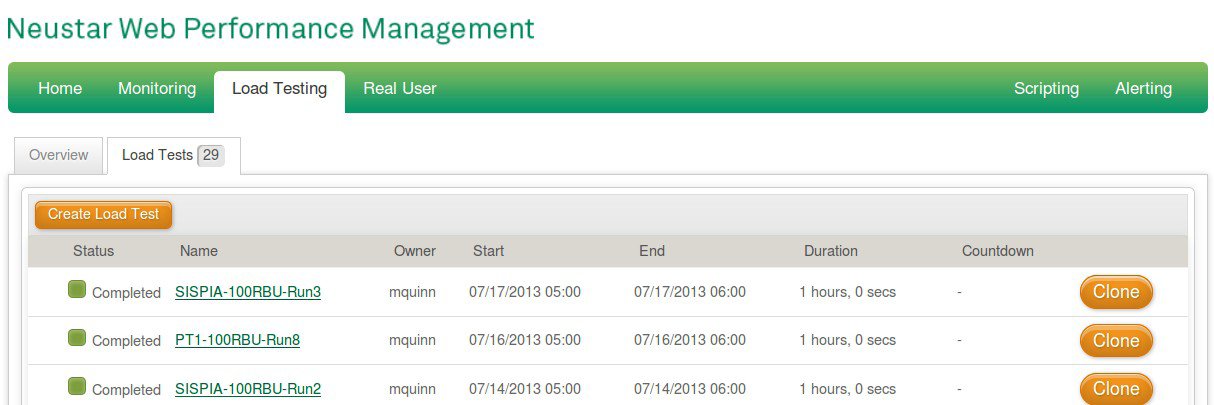
From this page, you can create new load tests, clone the settings from previous load tests, and view the results of currently running or previous load tests.
When creating a load test, you’ll need to specify the various phases of the test and the maximum number of users that should be simulated during that phase. During test execution, Neustar WPM will do its best to ensure that the number of users running is always equal to the maximum number of users you specify in each phase. As soon as one agent finishes running a test script, it is replaced by another, so long as the maximum user limit you specify is not exceeded.
Your test can be less than 60 minutes long, but as of this writing, Neustar charges you the same amount for a 30 minute test as it does for a 60 minute test, all other factors being equal.
You do not have to run the test immediately; uncheck the “Run as soon as possible” checkbox when scheduling a load test to specify a future date.
Understanding the Results of the Test
While a test is executing, Neustar will refresh the associated performance graphs, failure counters, and transaction and object totals. Various details will either be important or unimportant to you based on your particular testing objectives.
Of special note is the “Load Test Failures” section. For RBU tests, you can view screenshots of each failure that has occurred during the test, along with the total count for that particular failure and the line number in your test script where that failure occurred.
Neustar WPM also provides a SQL dump of the data collected during a test. Neustar will host these details for an hour after each test completes, during which you can run SQL queries against the underlying tables via their user interface. After an hour, Neustar will disable the online querying UI, but will still allow you to re-enable the UI, which will cost one cloud dollar per hour that you choose to enable it. You can also download the SQL dump and load it into your own MySQL instance for ad hoc querying.
Details on the schema for the database tables Neustar WPM provides for each test is available at https://community.neustar.biz/community/wpm/load_testing/blog/2010/02/20/adhoc-sql-queries.
Miscellaneous Notes
To run Neustar WPM tests against a system behind a firewall/VPN, you must remember to permit access to the blocks of IP addresses Neustar assigns to its load-testing machines. As of this writing, the various blocks Neustar uses can be found here: http://community.neustar.biz/docs/DOC-1016.
Example Test Script
The following code was developed to test various parts of the student self-service workflow in PeopleSoft Campus Solutions, as it existed in July 2013.
Note that there is a file dependency for this code; the test depends on the presence of a comma-separated list of single sign-on accounts from which to choose during authentication. The test expects this list to be present in a file called 5000_netbadge_accounts.csv.
/**
 *********************************
 * PSCS/PIA Enrollment Workflow Test
 *********************************
 * Author: Matt Quinn
 * Latest Revision: 07.15.2013
 */

var EP_URL = 'url_for_peoplesoft_enterprise_portal';

var csv = test.getCSV("5000_netbadge_accounts.csv");
var row = csv.random();

var COMPUTING_ID = row.get("User-id");
var NETBADGE_PWD = row.get("Password");

var TARGET_TERM = '2013 Fall';
var TARGET_COURSE = 'PHIL 1000';
var TARGET_DEPT = 'Philosophy';

var webDriver = test.openBrowser();
var c = webDriver.getHttpClient();
c.blacklistCommonUrls();

// @isRemoveMandatory : set to true if application logic mandates that
//              the removal must occur.
function removeEnrollmentRequestFor(targetCourseDescriptor, isRemoveMandatory) {

  webDriver.switchTo().defaultContent();  // switch to outer (EP) frame
  var homeLink = webDriver.findElement(
    By.xpath("//a[@class='EPPBRHDRHYPERLINK'][text()='Home']"));

  homeLink.click();
  test.waitForNetworkTrafficToStop(1000, 10000);

  webDriver.switchTo().frame(0); // switch to inner (CS) frame
  var addOption = webDriver.findElement(
    By.xpath("//select[@id='DERIVED_SSS_SCL_SSS_MORE_ACADEMICS']/option[text()='Enrollment: Add']"));
  addOption.click();

  var goButton = webDriver.findElement(
    By.cssSelector("img[name='DERIVED_SSS_SCL_SSS_GO_1$IMG']"));
  goButton.click();

  test.waitForNetworkTrafficToStop(1000, 10000);

  var termTable = webDriver.findElement(
    By.xpath("//table[@id='SSR_DUMMY_RECV1$scroll$0']"));
  var termRows = termTable.findElements(
    By.xpath("//tr[starts-with(@id, 'trSSR_DUMMY_RECV1$0_row')]"));

  test.log('[DEBUG] Term rows found: ' + termRows.size());
  test.assertTrue(termRows.size() > 0);

  var termMatchFound = false;
  for(i = 0; i < termRows.size(); i++) {
    var termDesc = termRows.get(i).findElement(
      By.xpath("td/div[starts-with(@id, 'win0divTERM_CAR$')]/span")).getText();
    test.log('[DEBUG] Found term: ' + termDesc);
    if(termDesc == TARGET_TERM) {
      var radioButton = termRows.get(i).findElement(
        By.xpath("td/div/input[@type='radio']"));

      radioButton.click();
      termMatchFound = true;
      break;
    }
  }

  test.assertTrue(termMatchFound);
  var continueButton = webDriver.findElement(
    By.cssSelector('a#DERIVED_SSS_SCT_SSR_PB_GO'));
  continueButton.click();

  test.waitForNetworkTrafficToStop(1000, 10000);

  var enrlReqTable = webDriver.findElement(
    By.xpath("//table[@id='SSR_REGFORM_VW$scroll$0']"));
  var enrlReqRows = enrlReqTable.findElements(
    By.xpath("//tr[starts-with(@id, 'trSSR_REGFORM_VW$0_row')]"));

  test.log('[DEBUG] Enrollment requests found: ' + enrlReqRows.size());

  var matchFound = false;
  for(i = 0; i < enrlReqRows.size(); i++) {
    var courseDescriptor = enrlReqRows.get(i).findElement(
      By.xpath("td/div[starts-with(@id, 'win0divP_CLASS_NAME$')]/span")).getText();
    test.log('[DEBUG] Found enrl req: ' + courseDescriptor);
    if(courseDescriptor.indexOf(targetCourseDescriptor) !== -1) {
      var trashButton = enrlReqRows.get(i).findElement(
        By.xpath("td/div/a[starts-with(@id, 'P_DELETE$')]"));

      trashButton.click();
      test.waitForNetworkTrafficToStop(1000, 10000);
      matchFound = true;
      break;
    }
  }

  if(isRemoveMandatory) {
    test.assertTrue(matchFound);
  }
}

// @deptNameOverride : set to value other than false to
//            search on a specific department.
function runSearchTransaction(deptNameOverride) {
  test.beginTransaction();

  /**
   * ==================================
   * BEGIN STEP
   * ==================================
   */
  test.beginStep("Click search link, select rand subj, wait, check.");

  webDriver.switchTo().defaultContent();  // switch to outer (EP) frame
  var homeLink = webDriver.findElement(
    By.xpath("//a[@class='EPPBRHDRHYPERLINK'][text()='Home']"));

  homeLink.click();
  test.waitForNetworkTrafficToStop(1000, 10000);

  webDriver.switchTo().frame(0); // switch to inner (CS) frame
  var searchLink = webDriver.findElement(
    By.cssSelector("a#DERIVED_SSS_SCR_SSS_LINK_ANCHOR1"));
  searchLink.click();

  test.waitForNetworkTrafficToStop(1000, 10000);

  var deptOptions = webDriver.findElements(
    By.xpath("//select[@id='SSR_CLSRCH_WRK_ACAD_ORG$0']/option"));
  test.assertTrue(deptOptions.size() > 0);
    test.log("[DEBUG] Number of dept options: " + deptOptions.size());

    var ugrdCareerOption = webDriver.findElement(
      By.xpath("//select[@id='SSR_CLSRCH_WRK_ACAD_CAREER$6']/option[@value='UGRD']"));
    ugrdCareerOption.click();

  if(deptNameOverride !== false) {
    var deptMatchFound = false;
    for(i = 0; i < deptOptions.size(); i++) {
      var currentDept = deptOptions.get(i).getText();
      if(currentDept == TARGET_DEPT) {
        deptOptions.get(i).click();
        deptMatchFound = true;
        break;
      }
    }
    test.assertTrue(deptMatchFound);
  } else {
    var randDeptIdx = Math.floor(Math.random() * deptOptions.size());

    // We don't want to select the blank option; if idx is 0 set it to 1.
    if(randDeptIdx == 0) {randDeptIdx = 1};

    test.log("[DEBUG] randDeptIdx = " + randDeptIdx);
    deptOptions.get(randDeptIdx).click();
  }

  var searchButton = webDriver.findElement(
    By.cssSelector("a#CLASS_SRCH_WRK2_SSR_PB_CLASS_SRCH"));

  searchButton.click();

  test.waitForNetworkTrafficToStop(1000, 15000);

  // Check for "over 300" message.
  try {
    var over300Msg = webDriver.findElement(
      By.cssSelector("span#DERIVED_SSE_DSP_SSR_MSG_TEXT")).getText();
    test.assertTrue(over300Msg.indexOf("Your search will return over 300 classes") !== -1);
    var continueButton = webDriver.findElement(
      By.xpath("//input[@type='button'][@id='#ICSave']"));
    continueButton.click();
    test.waitForNetworkTrafficToStop(1000, 15000);
  } catch (err) {
    test.log("Exception when checking for over 300 msg: " + err);
  }

  test.pause(30000);

  test.endStep();
  test.endTransaction();
};

// @isDropMandatory : set to true if application logic mandates that
//            the drop must occur.
function dropEnrolledCourse(targetCourseDescriptor, isDropMandatory){

  webDriver.switchTo().defaultContent();  // switch to outer (EP) frame
  var homeLink = webDriver.findElement(
    By.xpath("//a[@class='EPPBRHDRHYPERLINK'][text()='Home']"));

  homeLink.click();
  test.waitForNetworkTrafficToStop(1000, 10000);

  webDriver.switchTo().frame(0); // switch to inner (CS) frame
  var dropOption = webDriver.findElement(
    By.xpath("//select[@id='DERIVED_SSS_SCL_SSS_MORE_ACADEMICS']/option[text()='Enrollment: Drop']"));
  dropOption.click();

  var goButton = webDriver.findElement(
    By.cssSelector("img[name='DERIVED_SSS_SCL_SSS_GO_1$IMG']"));
  goButton.click();

  test.waitForNetworkTrafficToStop(1000, 10000);

  var termTable = webDriver.findElement(
    By.xpath("//table[@id='SSR_DUMMY_RECV1$scroll$0']"));
  var termRows = termTable.findElements(
    By.xpath("//tr[starts-with(@id, 'trSSR_DUMMY_RECV1$0_row')]"));

  test.log('[DEBUG] Term rows found: ' + termRows.size());
  test.assertTrue(termRows.size() > 0);

  var termMatchFound = false;
  for(i = 0; i < termRows.size(); i++) {
    var termDesc = termRows.get(i).findElement(
      By.xpath("td/div[starts-with(@id, 'win0divTERM_CAR$')]/span")).getText();
    test.log('[DEBUG] Found term: ' + termDesc);
    if(termDesc == TARGET_TERM) {
      var radioButton = termRows.get(i).findElement(
        By.xpath("td/div/input[@type='radio']"));

      radioButton.click();
      termMatchFound = true;
      break;
    }
  }

  test.assertTrue(termMatchFound);
  var continueButton = webDriver.findElement(
    By.cssSelector('a#DERIVED_SSS_SCT_SSR_PB_GO'));
  continueButton.click();

  test.waitForNetworkTrafficToStop(1000, 10000);

  var courseTable = webDriver.findElement(
    By.xpath("//table[@id='STDNT_ENRL_SSV1$scroll$0']"));
  var courseRows = courseTable.findElements(
    By.xpath("//tr[starts-with(@id, 'trSTDNT_ENRL_SSV1$0_row')]"));

  test.log('[DEBUG] Enrolled courses found: ' + courseRows.size());

  var isEnrolledInTargetCourse = false;
  for(i = 0; i < courseRows.size(); i++) {
    var courseDescriptor = courseRows.get(i).findElement(
      By.xpath("td/div[starts-with(@id, 'win0divR_CLASS_NAME$')]/span")).getText();
    test.log('[DEBUG] Found enrolled course: ' + courseDescriptor);
    if(courseDescriptor.indexOf(targetCourseDescriptor) !== -1) {
      var radioButton = courseRows.get(i).findElement(
        By.xpath("td/div/input[@type='checkbox']"));

      radioButton.click();
      isEnrolledInTargetCourse = true;
      break;
    }
  }

  if(isDropMandatory) {
    test.assertTrue(isEnrolledInTargetCourse);
  }

  // Wait for drop transaction to complete (if applicable).
  if(isEnrolledInTargetCourse) {

    var dropButton = webDriver.findElement(
      By.cssSelector("a#DERIVED_REGFRM1_LINK_DROP_ENRL"));

    dropButton.click();

    test.waitForNetworkTrafficToStop(1000, 10000);

    var finishButton = webDriver.findElement(
      By.cssSelector("a#DERIVED_REGFRM1_SSR_PB_SUBMIT"));

    finishButton.click();

    test.waitForNetworkTrafficToStop(1000, 10000);

    var resultDesc = webDriver.findElement(
      By.xpath("//table[@id='SSR_SS_ERD_ER$scroll$0']/tbody/tr/td/div[@id='win0divDERIVED_REGFRM1_SS_MESSAGE_LONG$0']/div")).getText();

    test.log("[DEBUG] Result description: " + resultDesc);

    test.assertTrue(resultDesc.indexOf('Success:') !== -1);
  }
};

/**
 * =====================================================================
 * BEGIN TRANSACTION
 * =====================================================================
 */
test.beginTransaction();

/**
 * ==================================
 * BEGIN STEP
 * ==================================
 */
test.beginStep("Navigate to NetBadge page");

webDriver.get(EP_URL);

// Wait for PeopleSoft Ajax pagelets to load.
test.waitForNetworkTrafficToStop(1000, 7000);

var sisLoginButton = webDriver.findElement(
  By.xpath("//input[@name='Netbadge'][@value='SIS Login']"));
sisLoginButton.click();

// Wait to be redirected to NetBadge login page.
test.waitForNetworkTrafficToStop(1000, 10000);

/**
 * ==================================
 * END STEP
 * BEGIN STEP
 * ==================================
 */
test.endStep();
test.beginStep("Submit NetBadge login and load self-service.");

var netBadgeForm = webDriver.findElement(
  By.xpath("//form[@name='query'][@action='index.cgi']"));
var compIdField = netBadgeForm.findElement(
  By.xpath("//input[@name='user']"));
var pwdField = webDriver.findElement(
  By.xpath("//input[@name='pass']"));
var netBadgeSubmitButton = webDriver.findElement(
  By.xpath("//form[@name='query'][@action='index.cgi']/p/input[@type='submit']"));

compIdField.sendKeys(COMPUTING_ID);
pwdField.sendKeys(NETBADGE_PWD);
netBadgeSubmitButton.click();

// Wait to be redirected and for PeopleSoft Ajax pagelets to load.
test.waitForNetworkTrafficToStop(1000, 10000);

test.endStep();
test.endTransaction();

/**
 * =====================================================================
 * BEGIN TRANSACTION
 * =====================================================================
 * Remove PHIL 1000 from enrollment requests if present.
 */
test.beginTransaction();

test.pause(5000);
test.beginStep("Remove PHIL 1000 from enrl reqs if present.");
removeEnrollmentRequestFor(TARGET_COURSE, false);

test.endStep();
test.endTransaction();

/**
 * =====================================================================
 * BEGIN TRANSACTION
 * =====================================================================
 * Drop PHIL 1000 if present in schedule.
 */
test.beginTransaction();

test.beginStep("Drop PHIL 1000 if in schedule.");
dropEnrolledCourse(TARGET_COURSE, false);

test.endStep();
test.endTransaction();

/**
 * =====================================================================
 * BEGIN TRANSACTION
 * =====================================================================
 * Execute random subject search #1.
 */
runSearchTransaction(false);

/**
 * =====================================================================
 * BEGIN TRANSACTION
 * =====================================================================
 * Execute random subject search #2.
 */
runSearchTransaction(false);

/**
 * =====================================================================
 * BEGIN TRANSACTION
 * =====================================================================
 * Execute random subject search #3.
 */
runSearchTransaction(false);

/**
 * =====================================================================
 * BEGIN TRANSACTION
 * =====================================================================
 * Execute random subject search #4.
 */
runSearchTransaction(false);

/**
 * =====================================================================
 * BEGIN TRANSACTION
 * =====================================================================
 * Execute random subject search #5.
 */
runSearchTransaction(false);

/**
 * =====================================================================
 * BEGIN TRANSACTION
 * =====================================================================
 * Execute search for target department (Philosophy).
 */
runSearchTransaction(TARGET_DEPT);

/**
 * =====================================================================
 * BEGIN TRANSACTION
 * =====================================================================
 * Enroll in PHIL 1000 (lecture and first discussion section).
 */
test.beginTransaction();

/**
 * ==================================
 * BEGIN STEP
 * ==================================
 */
test.beginStep("Click search link, search PHIL, and wait.");

var firstCourseDescriptor = webDriver.findElement(
  By.xpath("//span[@id='DERIVED_CLSRCH_DESCR200$0']")).getText();
test.assertTrue(firstCourseDescriptor.indexOf(TARGET_COURSE) !== -1);

var firstCourseSelectButton = webDriver.findElement(
  By.xpath("//a[@id='CLASS_SRCH_WRK2_SSR_PB_SELECT$0']"));

firstCourseSelectButton.click();

test.waitForNetworkTrafficToStop(1000, 10000);

var firstRelSectionRadioButton = webDriver.findElement(
  By.xpath("//input[@type='radio'][@id='SSR_CLS_TBL_R1$sels$0']"));

firstRelSectionRadioButton.click();

var continueButton = webDriver.findElement(
  By.xpath("//a[@id='DERIVED_CLS_DTL_NEXT_PB']"));
continueButton.click();

test.waitForNetworkTrafficToStop(1000, 10000);

var nextButton = webDriver.findElement(
  By.xpath("//a[@id='DERIVED_CLS_DTL_NEXT_PB$98$']"));

nextButton.click();

test.waitForNetworkTrafficToStop(1000, 10000);

var enrlReqsLink = webDriver.findElement(
  By.cssSelector("a#DERIVED_SSS_CRT_LINK_ADD_ENRL"));

enrlReqsLink.click();

test.waitForNetworkTrafficToStop(1000, 10000);

var enrlReqTable = webDriver.findElement(
  By.xpath("//table[@id='SSR_REGFORM_VW$scroll$0']"));
var enrlReqRows = enrlReqTable.findElements(
  By.xpath("//tr[starts-with(@id, 'trSSR_REGFORM_VW$0_row')]"));

test.log('[DEBUG] Enrollment requests found: ' + enrlReqRows.size());

var foundMatch = false;
for(i = 0; i < enrlReqRows.size(); i++) {
  var courseDescriptor = enrlReqRows.get(i).findElement(
    By.xpath("td/div[starts-with(@id, 'win0divP_CLASS_NAME$')]/span")).getText();
  test.log('[DEBUG] Found enrollment request: ' + courseDescriptor);
  if(courseDescriptor.indexOf(TARGET_COURSE) !== -1) {
    var radioButton = enrlReqRows.get(i).findElement(
      By.xpath("td/div/input[@type='checkbox']"));
    radioButton.click();
    foundMatch = true;
    break;
  }
}

test.assertTrue(foundMatch);

var enrollButton = webDriver.findElement(
  By.cssSelector('a#DERIVED_REGFRM1_LINK_ADD_ENRL'));

enrollButton.click();

test.waitForNetworkTrafficToStop(1000, 10000);

var finishButton = webDriver.findElement(
  By.cssSelector("a#DERIVED_REGFRM1_SSR_PB_SUBMIT"));

finishButton.click();

test.waitForNetworkTrafficToStop(1000, 10000);

var resultDesc = webDriver.findElement(
  By.xpath("//table[@id='SSR_SS_ERD_ER$scroll$0']/tbody/tr/td/div[@id='win0divDERIVED_REGFRM1_SS_MESSAGE_LONG$0']/div")).getText();

test.log("[DEBUG] Result description: " + resultDesc);
test.assertTrue(resultDesc.indexOf('Success:') !== -1);

test.endStep();
test.endTransaction();

/**
 * =====================================================================
 * BEGIN TRANSACTION
 * =====================================================================
 * Drop PHIL 1000.
 */
test.beginTransaction();
test.beginStep("Drop PHIL 1000, wait, and check.");

test.pause(5000);
dropEnrolledCourse(TARGET_COURSE, true);

/**
 * ==================================
 * END STEP
 * ==================================
 */
test.endStep();
test.endTransaction();

/**
 * =====================================================================
 * BEGIN TRANSACTION T11
 * =====================================================================
 * Log out of SIS.
 */
test.beginTransaction();
test.beginStep("Log out of SIS.");

webDriver.switchTo().defaultContent();  // switch to outer (EP) frame
var sisLogoutLink = webDriver.findElement(
  By.xpath("//a[@class='EPPBRHDRHYPERLINK'][@target='_top']"));

sisLogoutLink.click();

test.waitForNetworkTrafficToStop(500, 10000);

/**
 * ==================================
 * END STEP S17
 * ==================================
 */
test.endStep();
test.endTransaction();